
How do you put clothes on an AI model?
In sameface, it happens inside your Shopify admin. The photo on your product page is the reference for the garment, so there is nothing to upload and no shoot to book.
- Pick the products. Choose up to ten products from your catalog for one run. The app uses each product's photo as the garment reference.
- Choose the model. Pick a stock AI model, or create your own, and lock its face as the reference for later shoots.
- Choose the scene. A studio look with a plain background, or a lifestyle scene such as a café, a street or a room at home.
- See the price, then generate. Each photo costs $0.08 USD, and your first 15 images are free.
- Review and publish. Compare each result with the real garment, then add the ones you choose beside your existing product photos.
One sweater, one model, three scenes
These four images come from sameface's own sample library. The folded sweater is a synthetic product photo, and the app generated the three model photos from it, with its stock AI model Maya as the face reference. No real person and no real store's product appear in them.
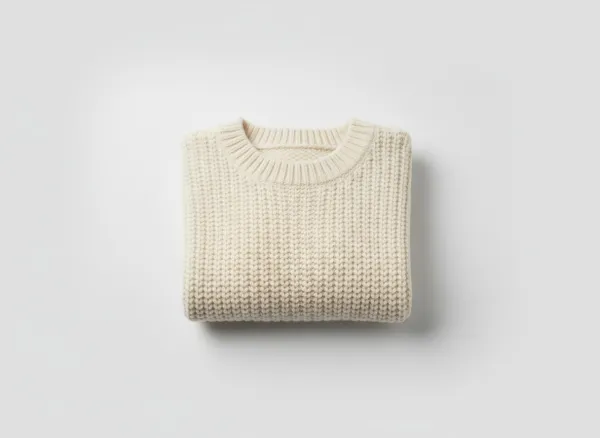
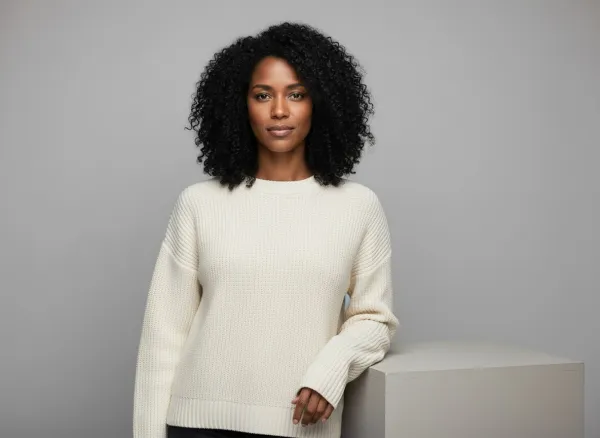


The fit, drape and sleeve length are drawn from a flat photo, so treat them as an illustration and check them against the real garment. The interactive demo shows the same sweater in more scenes, next to beauty and tech samples.
Studio or lifestyle?
A studio scene keeps a plain, even background, so a collection reads as a set on your collection page. A lifestyle scene shows how a piece is worn and styled, which suits the second or third image on a product page, an email or a social post. Both can start from the same product photo, and you choose which to publish.
Is this a virtual try-on?
No. sameface makes photos for your store's own product pages. Shoppers do not upload a photo of themselves or see your clothes on their body, and nothing is added to your storefront apart from the photos you publish. The model is an AI-generated person, not a real model, so do not present the photos as a customer or a real person wearing the item.
sameface also does not remove backgrounds or make white-background cut-outs. It makes new scenes around the garment, from the photo you already have.
What to check before you publish
- Fit and length. The app infers the fit from a flat photo. Compare the neckline, sleeves and hem with the real garment.
- Colour and texture. Check the colour against the real fabric, and look closely at knit, print and stitching.
- Logos and prints. Lettering and patterns can change. Do not publish a result where a print differs from the product.
- Hands and face. Look for odd fingers, and for small changes to the face between shots.
From a model photo to a product video
A photo you approve can become a five- or ten-second product video, at $0.14 USD a second, or $0.28 at best quality: a five-second standard clip is $0.70. See the product video samples and prices. To reuse one model across a whole collection, read AI model photos with a face you lock.
Questions apparel merchants ask
Is this a virtual try-on for shoppers?
No. It makes photos for your product pages. Shoppers cannot upload a photo or try clothes on in your store.
Can I use my own model?
You can pick a stock AI model or create a custom one in the app, then lock its face as the reference. It is an AI-generated person, not a photo of a real model, and details can still vary between shots.
What product photo do I need?
The photo already on your Shopify product. The app uses it as the garment reference, so the whole garment should be visible and in focus, as in a flat-lay or a packshot.
Can I do my whole catalog at once?
No. A run covers up to ten products, and you review every result before anything is published.
Does it publish to my store automatically?
No. You choose each photo to publish. It is added beside your existing product photos, and nothing is replaced.
What does it cost?
$0.08 USD per photo. New merchants get 15 free images once; model portraits and scene previews count toward them. There is no monthly fee. Paid generation needs a Shopify usage subscription you approve, with a $100 USD cap by default.